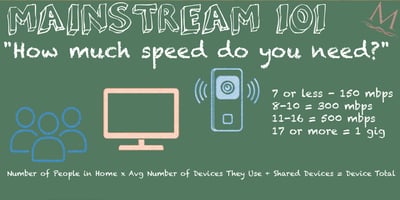
Time to grab your calculators and trapper keepers, it's time for Mainstream 101! Today, we're...
New Year, New Devices? Here's How Your Internet Can Keep Up
The holidays often bring an exciting wave of new tech into the home. From smart TVs, gaming consoles, tablets, security devices, voice assistants, smart appliances, and more. But while these new gadgets make life easier and more entertaining, they also place new demands on your home network. If your internet isn’t prepared for the increased device load, you may start the new year with buffering, lag, or Wi-Fi slowdowns you didn’t expect.
Here’s how to make sure your connection is ready to support every device in 2026 and beyond.
1. Count Your Devices (You Probably Have More Than You Think)
Most households underestimate the number of connected devices using their Wi-Fi. Between streaming sticks, laptops, phones, smart speakers, thermostats, security cameras, and new holiday gifts, the total often reaches 20–40 devices.
More devices = more bandwidth in use at the same time.
A quick audit helps you decide whether your current speed tier still fits your home’s needs or if it is time for an upgrade.
2. Make Sure You Have Enough Speed for Everyone
If you added more devices this year, upgrading your speed might be the easiest way to keep everything running smoothly. Faster tier speeds help prevent issues like buffering, slow downloads, laggy video calls, and Wi-Fi congestion.
A good rule of thumb:
-
Choose a lower-to-mid speed for smaller households with lighter use
-
Move to a higher tier if you have multiple people streaming, gaming, or working online at the same time
-
For homes with lots of new devices or smart-home tech, the fastest available option will deliver the best experience
Fiber internet provides the consistency that households with growing device lists need especially during peak-use evenings.
3. Optimize Your Wi-Fi Setup
Sometimes the issue isn’t your speed it’s your Wi-Fi environment.
A few key adjustments can dramatically improve performance:
-
Place your router in a central, open location
-
Keep it off the floor and away from large appliances
-
Ensure it’s not hidden in a cabinet
-
Restart the router occasionally to clear background processes
These small tweaks help all your devices connect more efficiently.
4. Consider Upgrading Your Equipment
Newer devices perform best on modern routers and Wi-Fi systems.
If your router is more than 3–4 years old, it may struggle to keep up with today’s speeds.
Upgrading to a system with better coverage such as whole-home mesh Wi-Fi can eliminate dead spots, improve reliability, and ensure every new device gets the strong connection it needs.
5. Strengthen Your Network for Gamers and Streamers
New gaming consoles or 4K TV setups draw significant bandwidth.
If your household upgraded one or several of these over the holidays, you may see immediate performance benefits from:
-
Higher download speeds
-
Lower-latency fiber connections
-
Better-quality Wi-Fi hardware
-
Hardwiring consoles or TVs for peak stability
Start the New Year with a Stronger Connection
A new year brings new routines and often a lot of new devices. Making sure your home network is prepared helps every gadget run its best, keeps your family connected, and ensures you get the most out of your holiday tech.
If your home could benefit from more speed, better Wi-Fi coverage, or upgraded equipment, now is the perfect time to make the switch and start 2026 with a network that can truly keep up.
Call to upgrade at (844) 635-1849 or visit msfiber.net