Yes, Fiber Internet Works in Older Homes Many homeowners living in older or historic houses assume...
How to Get the Most Out of Your Home Wi-Fi
Maximize Your Connection by Optimizing Your Home Wi-Fi
In an era where our homes are filled with everything from smartphones and laptops to smart thermostats and video doorbells, the quality of your Wi-Fi is just as important as the speed of the service entering your house. Many users assume that a slow connection is always a result of their internet plan, but the culprit is often the physical environment of the home itself. By understanding how wireless signals travel, you can make simple adjustments that dramatically improve your coverage and speed without adding a single penny to your monthly bill.
The most common mistake people make is hiding their router inside a cabinet, behind a television, or tucked away in a remote corner of the basement. Wi-Fi signals are radio waves that struggle to penetrate solid objects like brick, concrete, and metal. For the best performance, your router should be placed in a central, elevated location. Think of your router like a light bulb; if you put it in a drawer, the light cannot reach the rest of the room. By placing it on a high shelf or a central table, you allow the signal to broadcast downward and outward across a much larger area.
Interference and Dead Zones
Interference from other household electronics is another silent performance killer. Common appliances such as microwaves, baby monitors, and cordless phones often operate on the same frequencies as older Wi-Fi routers. If you find your connection drops every time you heat up a snack, you likely have frequency interference. Upgrading to a modern router that supports 5GHz or 6GHz bands can solve this issue because these frequencies are less crowded and provide much faster data pathways.
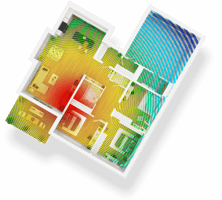
Even with perfect placement, larger homes or houses with unique layouts may suffer from dead zones. If you have areas where the signal simply disappears, a mesh Wi-Fi system is a far superior solution compared to traditional single-point routers. Unlike a standard extender that creates a second, weaker network, mesh nodes work together to create a single, seamless blanket of coverage throughout the entire property. For those who want to take their connection to the patio or garage, adding an outdoor booster can ensure your security cameras and outdoor speakers stay connected year-round.
Small changes in your equipment and habits can lead to a massive leap in performance. Ensuring your router firmware is up to date and occasionally rebooting the system can clear out background "noise" and keep the connection stable. Before you consider changing your data plan, take a moment to audit your current setup and see if your hardware is truly working at its full potential.
Your Home Network Performance Checklist
To determine if your home network is optimized, go through this quick checklist to identify potential bottlenecks.
- Is your router placed in a central location away from thick walls or metal appliances?
- Is the router elevated on a shelf rather than sitting on the floor or inside a cabinet?
- Have you counted every connected device, including "hidden" ones like smart bulbs and printers?
- Do you experience "dead zones" in specific rooms or on different floors of the house?
- Is your router more than three or four years old?
- Have you run a speed test in different rooms to see where the signal drops significantly?
If you find that your current setup is still struggling after making these adjustments, it might be time to look into premium hardware or a mesh network solution.